One library, whole band
Stop passing files around. Work on the same songs.
Everyone opens the same library. Mix stems, drop markers, sync lyrics, swap videos, and it is there for the rest of the band the next time they open it. Roles for admin, write and read. Invite a bandmate with a link.
- Versions never overwriteEvery save is kept. Yours sits beside the last one, not on top of it.
- Restore one songSomebody mangled the bridge? Bring that song back the way it was. Nobody else's work moves.
- Notes on the timelinePin a note at 1:12 for the drummer. It stays with the song.
- ActivitySee what changed while you were gone, and who changed it.
The editor
One calm canvas. Transport at the bottom.
The editor has a new look. One near-black canvas, one blue accent, and the transport along the bottom like a player. Track rows show each stem's family and output at a glance and bring out routing, gain and transpose when you reach for them.
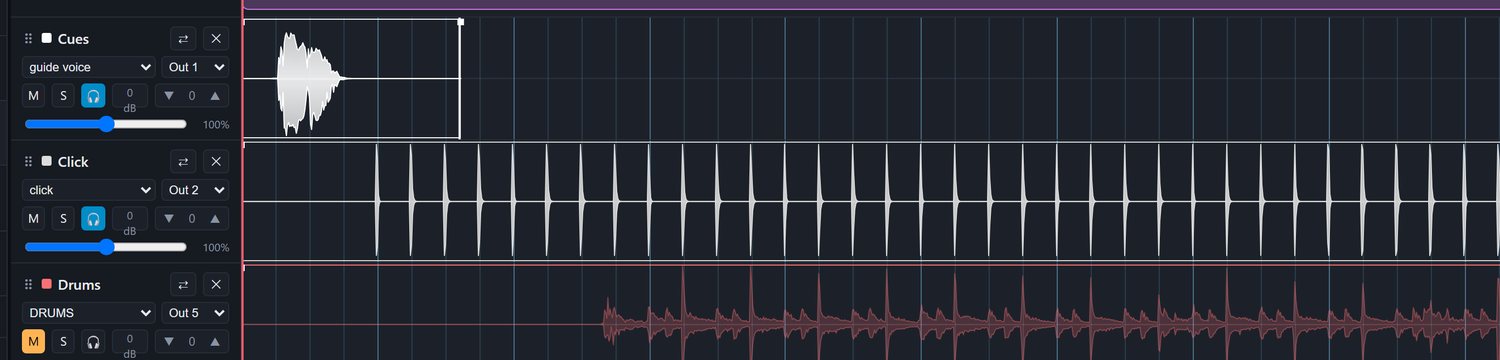
- Preview pane you can sizeDrag it bigger when you are aligning video. Fold it to a strip when you are mixing.
- Markers fold, mutes stayThe markers lane folds away when you do not need it. Family mutes stay pinned while you scroll the stems.
- Beat grid, trims, fadesSnap to the grid, trim heads and tails, fade in and out. Transpose a track or the whole song.
- Round trip to ReaperOpen a song with its stems and video in Reaper. Pull your renders back in.
- Bring what you haveA B.Beat .backup, a single-song .export, a zip of stems, or start from scratch.
- Split a mix into stemsOne mixed file becomes drums, bass, other and vocals (or six stems), each in its family, with a click at the song's tempo.
- A headphone send per trackSend any stem to the phones on top of its normal routing.
The Shed
Catch the riff before it is gone.
Hit record the second it hits. Dry from your mic, or wet through your live amp tone, to a metronome with a count-in. Review the takes, keep the good ones, and the band gets one notification, not one per take.
- Riff to song in one clickThe riff becomes the first stem, with a click track at your tempo.
- Takes stay yours until you say soRecord as many as you like on your machine. Decide what the band hears when you close.
- Filters and a player per riffFilter by who recorded it, wet or dry, and what it is filed under. Every riff plays in place.
- File it under a songAttach a riff to the song it belongs to, so it is there when you build.
Lyrics, right beside the riff.
A scratchpad the band shares. Type, paste, or import from .txt, PDF or Word. Press Use in a song and the words land in that song's teleprompter.
Wet recording through the amp needs the free setshed desktop app.

Your rehearsal space
Your own practice room, inside the band's library.
Flip into rehearsal mode and the mix is yours alone. Mute your part, loop the hard bars, transpose to your voice. Nothing you do here touches what the band sees.
- A-B loop that snaps to barsDrop the points anywhere. They land on the bar lines.
- TransposeA track or the whole song, in semitones.
- Metronome and tunerTap tempo, accents, and a chromatic tuner, in the same window.
- Rehearse a whole setRun the night in order with your mix. Nothing is written to the band.
- Through your live ampYour own tone over the backing tracks while you drill the part.
- Saved to youYour rehearsal setup follows your profile, not the band's song.
Live guitar tone
Plug in. The amp lives next to the songs.
A real amp and cab over your backing tracks while you rehearse, built on Neural Amp Modeler captures, including the light A2 models. 260+ amps and 430+ cabs come stock. Any .nam drops in: captures from community libraries like TONE3000, or ones you train from your own rig.


- The chainGate, amp, EQ, cab. A full-rig capture brings its cab and loudness with it, and setshed handles both.
- Rigs per songSave a named rig with the song. Load the song, get the tone.
- Shares your output by defaultYouTube and the video preview keep playing while the amp is on. Exclusive mode is one click away when you want the last few milliseconds.
Needs the free setshed desktop app (Windows, macOS, Linux).
Seamless openers
Walk-on to downbeat with no dead air.
Drag one marker. The count-in tucks under your intro video's tail and the downbeat lands the instant it ends. Lyrics, markers and video move together, and you hear the transition before you commit.

Setlists and shows
Build the night, then watch it run itself.
Playlists for rehearsal, shows for the gig. Scenes with auto-advance through a block, a stop for banter, then roll again. Metronome counts, breaks and video slots sit in the running order next to the songs.
- True runtime. The footer counts the music and the gaps, so the set is as long as you think it is.
- Print / PDF sheet for the monitor and the merch table.
- Rehearse this set runs the order with your own mix and your own tone.
- Preview show runs it on screen, song to song.

A teleprompter on any screen you have.
Lyrics, chords or PDF charts, timed to the song with auto page-turns. Font and colours are yours. Cast it to any phone on your Wi-Fi and the mic stand becomes the monitor.

Show preview
Watch the whole set run before you play it.
Press play and the night runs itself: video, synced lyrics and the running order moving together, rolling song to song. Catch the wrong video, a lyric that drifts, or a gap in the wrong place at home, not at soundcheck.
Rig automation
Your modeler changes patches on its own, in time.
Build a per-song timeline of Program Change and CC cues. setshed fires them over MIDI as the set plays, so your modeler, synth or multi-FX switches presets on the bar and you stop tap-dancing between parts. Map any device to a channel and save named presets to reuse across songs.
Sends MIDI straight from the browser over Web MIDI. Chrome or Edge.

Works with B.Beat
From your library to the stage in one click.
Drop in the .backup you already have and your library appears in the browser. When the set is ready, Send to B.Beat pushes it to the device over your network, or sync one song live with no restart.
- Check & save moves only what changed. A two-second check that reads no audio names what changed on the device: new songs, changed audio, a moved fader, an edited setlist. It saves just that.
- Setlists and playlists come across both ways. Playlists built on the B.Beat arrive when you save from the device. Update setlists brings them without a full save.
- A dry run that shows what a Send would change, and Compare audio that checks every stem on the device against the cloud.
- Your backup stays the safety net. setshed never touches the original file.
Device sync runs through the free desktop app. Verified on B.Beat Evo.

Pricing
Free while we're in beta. Simple when we launch.
One bill per band, never per member. These are the launch prices; billing arrives with the full release, and beta bands keep 40% off their first year as founding bands.
Shed
Kick the tires, sketch ideas.
- 1 member · 2 GB
- Full editor & mixer
- B.Beat sync included
- Stem splitting: 2 to try
Solo
The solo & duo act with a B.Beat.
or $100/yr: 2 months free
- 1 member · 25 GB
- Everything in Shed
- Full version history
- Stem splitting included
- Email support
Band
One library the whole band works on.
or $190/yr: 2 months free
- Up to 6 members · 60 GB
- The Shed, notes & roles
- Stem splitting included
- A rehearsal space per member
- Priority support
Stage
MDs, deps and multi-project players.
or $390/yr: 2 months free
- Up to 12 members · 3 bands
- 150 GB pooled storage
- Everything in Band
- Priority support
Storage is pooled per account and nothing is ever deleted for going over: uploads pause until you clear space or move up a tier. Every tier syncs to a B.Beat through the free desktop app.
Request access
Get your band into the beta.
We bring bands in a wave at a time, so we can keep it stable and actually read your feedback. Tell us a bit about your setup and we'll send an invite when your spot opens.
The honest fine print: setshed is an independent, community-built tool, not affiliated with M-Live. It's a closed beta: free while we shake it out, and your feedback decides what gets built next. Keep a backup of your library like you always would.