B.Beat & the agent
Everything between your cloud library and the hardware runs through the setshed agent — a small tray app on the computer that shares a network with your B.Beat.
Send to B.Beat
The 🔌 Device dropdown in the toolbar gathers every device action: ⤴ Send, ⤵ Check & save to cloud, ⌨ Enter the address manually and ⚙ Wi-Fi & device settings. The top of the menu says whether the agent and the B.Beat are connected, and what to try when they are not.
🔌 Device → ⤴ Send pushes the band's library to the device over your network. Safety rails, in order:
- Firmware check — a library authored on newer firmware than the device runs pauses for your confirmation.
- Destructive-restore guard — if the library you're sending is missing songs the device has, setshed names them and makes Cancel the big button. A full restore replaces the whole device library; it will never quietly delete songs.
- Single songs can be synced live — right-click a song → Sync to B.Beat — updated in place with no reboot, or added if it isn't there.
Ask before you Send
A Send carries song changes, mixer moves, removed tracks, lyrics, chords, markers and, since 15 October, playlists, all live with no reboot; a playlist naming a song the unit does not have, or one that was edited on the unit since the last send, makes the Send a full send and says so. Shows still need a full send. The Send dialog reads the unit first when the helper can (so the plan is judged from the B.Beat as it is), stops to show what is about to go, and offers two read-only checks at the bottom. Both appear once the agent is 0.7.101 or newer. Send itself still uses the path above.
- 🔍 Check against the device reads the device's own database and lists what a Send would do: which songs would change, which stems would be re-sent, whether the B.Beat already matches. Nothing is written. Copy details puts the full report on your clipboard, so if anything looks wrong you can paste it into Discord.
- 🎧 Compare audio reads every stem back off the device and compares it with the cloud's copy. Pick Just this song or Every song. It reads the whole audio, about a minute per 75 MB, so a full library takes a while. Nothing is written.
Check & save to cloud
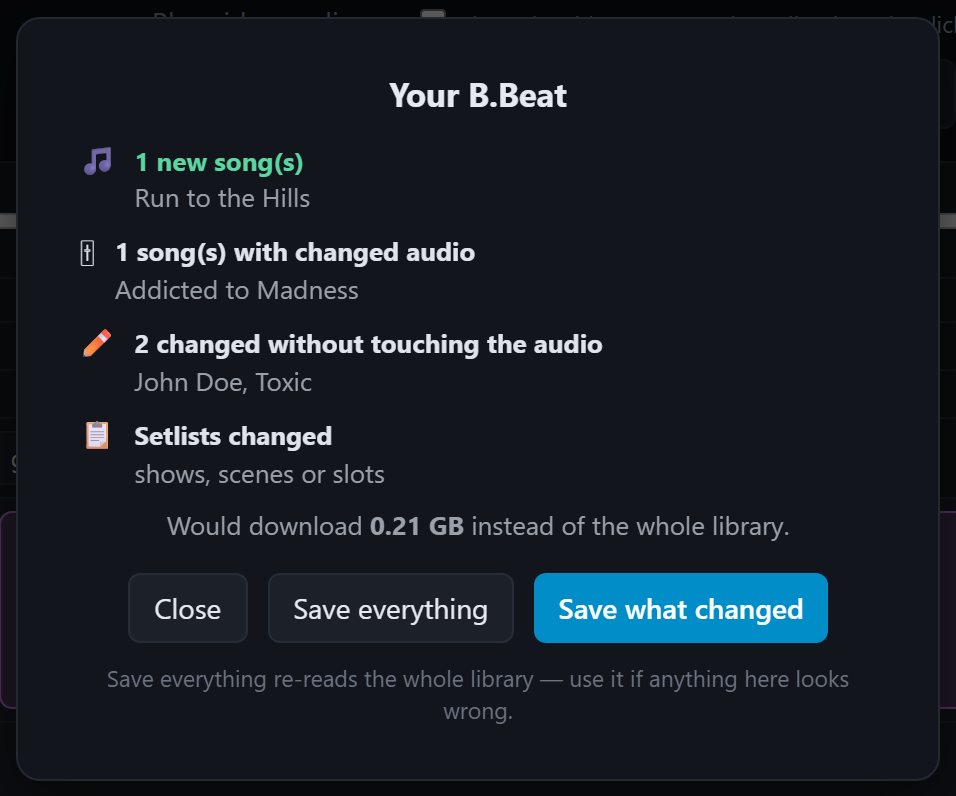
⤵ Check & save to cloud is how edits made on the device get home. It starts with a two-second check that reads no audio and tells you exactly what changed:
- New songs — imported whole.
- Changed audio — only the stems that actually changed are transferred, byte-exact.
- Changed without touching the audio — a fader, a rename, a folder, lyrics, chords, markers: applied with zero download.
- Setlists built on the device come across too.
- Removed songs are only listed. Saving never deletes anything from the cloud.
Save everything is always one click away — use it the first time on a new computer, or whenever the check looks wrong.
When the B.Beat won't show up
- Same network — the B.Beat and the agent computer must share a Wi-Fi/LAN.
- The browser permission (Chrome/Edge): 🔌 Device menu → 🔓 Let setshed reach this computer → Allow. This looks exactly like "the agent isn't running" — and it isn't; it's the browser.
- Discovery blocked? Some routers don't forward mDNS. Use ⌨ Enter the B.Beat address manually — the IP is on the device's own network screen.
- The diagnostic page: 🔌 Device menu → Why can't setshed see my agent? opens a plain-text report of what your network is actually doing. Paste it into Discord and we can usually tell you the fix in one message.
- B.Beat Manager open? The device talks to one controller at a time. Close Manager before a Send, then retry.
USB export
⇉ Export to USB… is in the desktop app (setshed studio) only, not the hosted editor. It writes the library in the format the B.Beat's official update path expects, for when you'd rather not push over the network. In the browser, Send is the route.