Section behaviours
A marker names a point in a song — Intro, Verse, Solo, Outro. The stretch from one marker to the next is a section, and every section can be told what to do when playback reaches its end.
That's how you drill the bridge twenty times, cut the second solo out of the arrangement for tonight, or have the song stop dead at the end of the intro and wait for the singer.

Adding one
Markers first: right-click the marker lane to drop one, or press M while the song plays to place it at the playhead. Drag a flag to move it, double-click to rename.
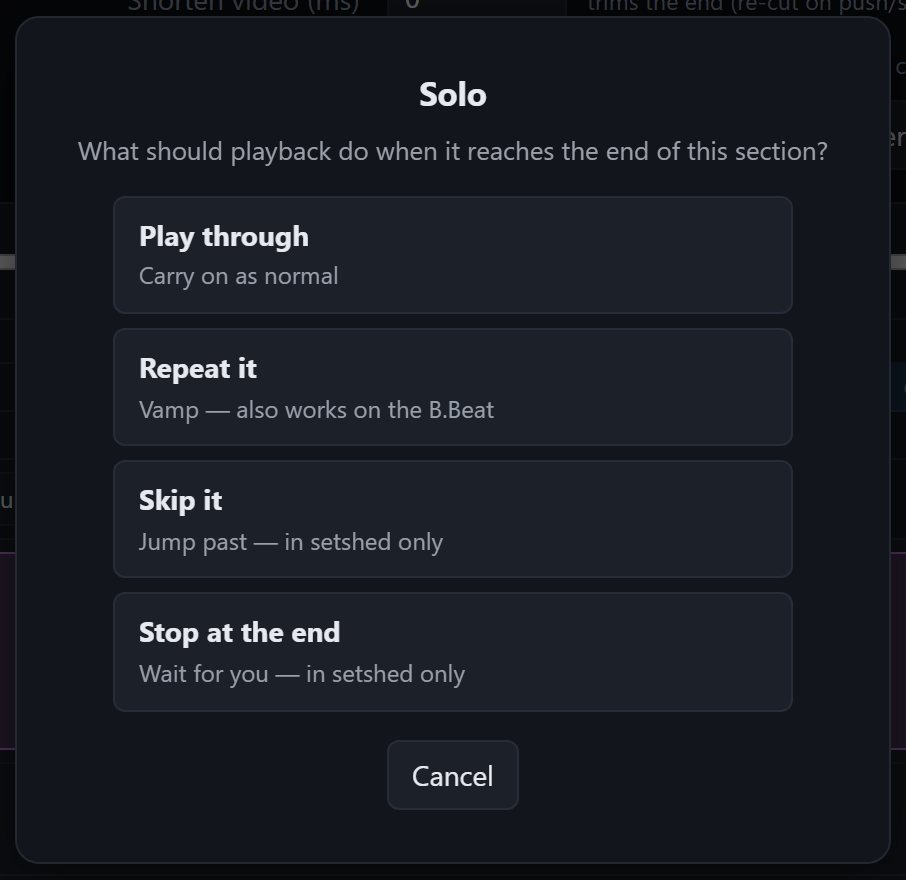
Then click the ⟳ on the flag and pick what happens at the end of that section:
| Behaviour | What playback does |
|---|---|
| Play through | Nothing special — the default |
| Repeat it | Plays the section N times before moving on |
| Skip it | Jumps straight past the section |
| Stop at the end | Halts and waits for you |
A section with a behaviour shows a chip on its flag — ×3, skip, pause — so an arrangement's shape is readable at a glance rather than hidden in a dialog.
What reaches the B.Beat
This is the part worth understanding, because the four behaviours are not equal.
Repeat travels to the device. The B.Beat's own marker data has always carried a repeat count; setshed now writes it. A section set to play three times plays three times on the hardware, with no computer in the room.
Skip and stop-at-end are setshed only. The device has nowhere to put them, so they shape playback in your browser — arranging, rehearsing, checking a cut before you commit — and the unit plays the song straight through. The picker labels each option so you always know which one you're choosing.
They do survive a round trip, though. Rather than keep them in a sidecar file the B.Beat would drop, setshed writes them into the marker's own name — a section called Solo with a skip becomes Solo ⟨skip⟩ on the device. The unit treats it as text and hands it back untouched, so ⤵ Check & save to cloud never loses your arrangement.
If you see
⟨skip⟩on the B.Beat's screen, that's why. Clear the behaviour in setshed and the name goes back to normal on the next sync.
Rehearsing with them
Repeat counts are per play, not per session: hit stop and every section's counter resets, so a bridge set to ×4 gives you four passes each time you start the song, not four for the rest of the afternoon.
Behaviours also apply inside Rehearse this set and your practice space — which is where most of them earn their keep. For a hard passage, the A–B loop is still the better tool: it snaps to the beat grid and needs no markers. Section behaviours are for shaping the arrangement; A–B is for drilling bars.