Lyrics, chords & the teleprompter
Open a song and click 📄 Teleprompter in the song header. It has three tabs: Chart, Lyrics and Chords. To watch the result as the song plays, switch the preview pane's Media / Lyrics / Chart buttons to Lyrics.
Getting words in
- Type or paste straight into the Teleprompter's Lyrics tab.
- From the Shed: the Shed's Lyrics tab is where files come in (⇪ Import file takes
.txt, PDF or Word) and where the band keeps words for songs that don't exist yet. A lyric's 🎵 Use in a song ▾ pushes its text into the song's teleprompter, replacing the lines there. The lines arrive untimed, so Sync mode (below) is the next step. - Chords are a plain text sheet on the Teleprompter's Chords tab. It travels to the B.Beat with the song and shows on the device's own prompter.
- PDF charts — attach a chart to a song and the pages turn with the music.
Sync mode — timing lines to the music
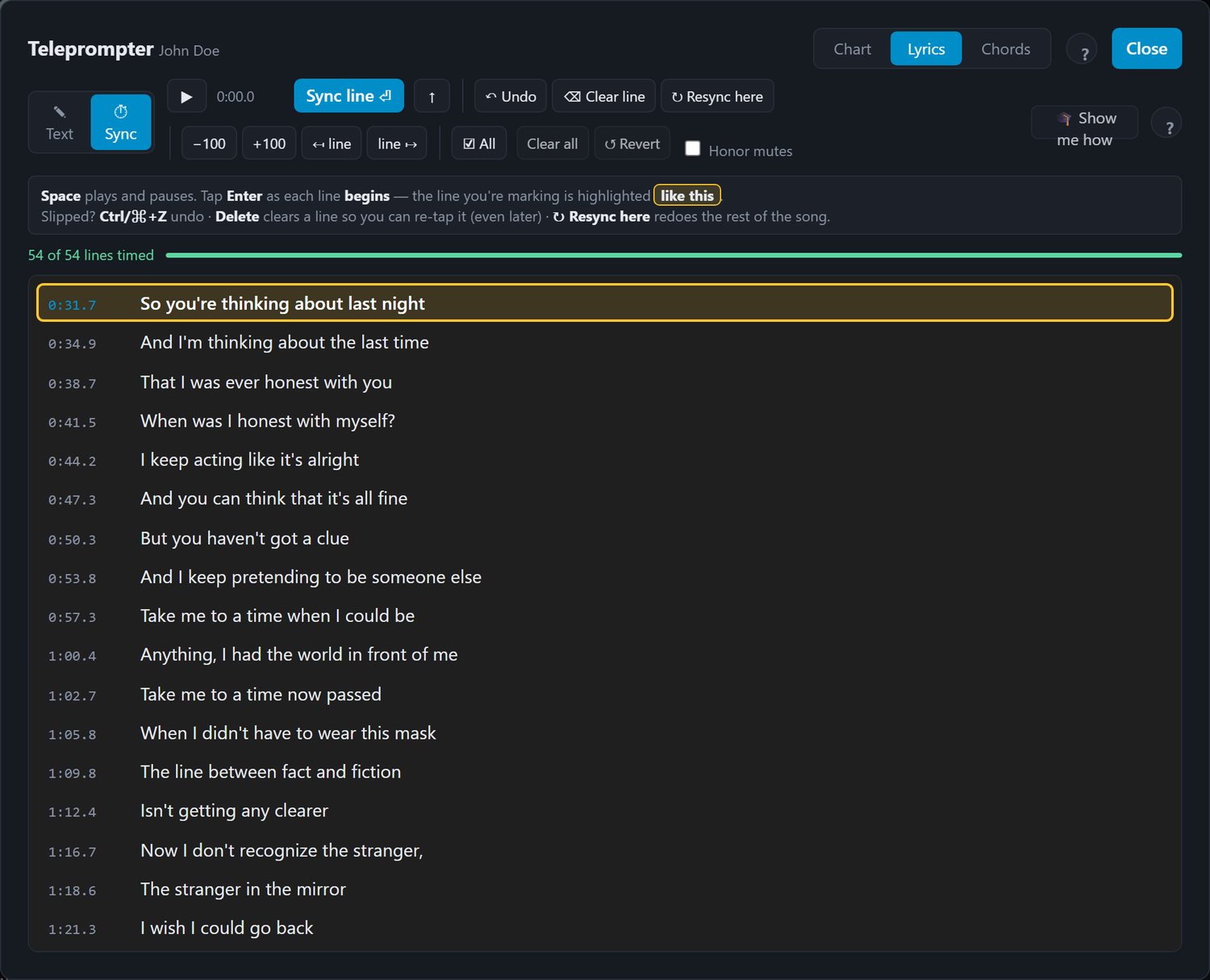
Sync mode is how a lyric line gets a timestamp so the prompter can follow the song.
Play the song and tap at the start of each line — this matches the B.Beat exactly, which expects the stamp at the moment a line begins, not when it ends. If your prompter runs a line ahead or behind, that's the fix.
Tools while syncing:
- Undo (Ctrl/⌘+Z) and clear a selection (Delete).
- Nudge: −100 and +100 move the selected line(s) 100 ms earlier or later. Tick ☑ All first to move every timed line in the song.
- Resync from here — retime the rest of the song without redoing the start.
- Shift one line later — the one-click fix for a prompter consistently running ahead.
- Video — the song's video plays beside the lines, following the song. On a lyric video the words land exactly where you want to tap, which beats guessing from a vocal-less backing track. Switch it off if you would rather have the room; setshed remembers your choice.
Themes
Font, size and colours are configurable to match the B.Beat's own prompter. With a device connected you can download the prompter fonts from it so what you see on screen is what the unit will render.
Cast to a phone
In the show preview (📚 Library → 🎵 Setlists → ▶ Preview show), the 📱 button on the transport bar mirrors the prompter to a phone on the same Wi-Fi: scan the QR code or open the URL on any handset. It follows the preview live and the audio stays on the computer. A personal lyric monitor at rehearsal without extra hardware.
On stage
Lyrics travel with the song to the B.Beat, so the device shows them on its own screen and HDMI output. Everything you set here — timings, chords, theme — is what the unit plays back.